漂亮的标签展示
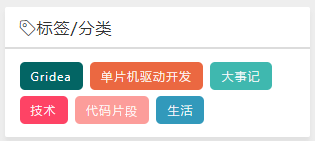
1. html代码
<div class="dict">
    <p class="pcolor">
        <% site.tags.forEach(function(tag) { %>
            <a href="<%= tag.link %>" style="text-decoration: none">
                <%=tag.name %>
            </a>
        <% }); %>
    </p>
</div>
2. CSS 代码
.dict {clear:both ;text-align:left;font-size:12px;}
.dict a {
  line-height: 24px;
  display: inline-block;
  background: #fff;
  padding: 2px 11px;
  margin: 3px 3px 3px 0;
  border-radius: 5px;
  -moz-transition: all 0.5s;
  -webkit-transition: all 0.5s;
  -o-transition: all 0.5s;
  transition: all 0.5s;
}
.dict a { color: #FFF;text-decoration:none }
.dict a:hover { border-radius: 0; text-shadow: #000 1px 1px 1px }
.dict .pcolor a:nth-child(8n-7) { background: #8A9B0F }
.dict .pcolor a:nth-child(8n-6) { background: #EB6841 }
.dict .pcolor a:nth-child(8n-5) { background: #3FB8AF }
.dict .pcolor a:nth-child(8n-4) { background: #FE4365 }
.dict .pcolor a:nth-child(8n-3) { background: #FC9D9A }
.dict .pcolor a:nth-child(8n-2) { background: #EDC951 }
.dict .pcolor a:nth-child(8n-1) { background: #C8C8A9 }
.dict .pcolor a:nth-child(8n) { background: #83AF9B }
.dict .pcolor a:first-child { background: #036564 }
.dict .pcolor a:last-child { background: #3299BB }
如果这篇文章对您很有帮助,不妨


----- 本文结束 ❤ 感谢您的阅读 ----
上一篇
通俗易懂的理解动态ip和静态ip
- 本文作者: Memory
- 本文链接: https://www.mzpkz.top/post/2020-1-21-22-17/
- 版权声明: 本博客所有文章除特别声明外,转载请注明出处!